Spectral Density \(J(\omega)\)
Goal
In this tutorial you will learn how to:
Compute the spectral density \(J_{\alpha\beta}(\omega)\) from pre-computed dyadic Green’s function (GF) data stored in HDF5 files.
Plot the resulting spectral density curves with customisable layout, labelling, and styling.
The spectral density links the electromagnetic environment (encoded in the imaginary part of the dyadic Green’s function) to the energy-transfer coupling between quantum emitters. It is defined as
where \(\boldsymbol{\mu}_{\alpha,\beta}\) are the transition dipole moments of the donor and acceptor, and the result is expressed in units of eV.
Prerequisites
A working MQED installation (see Getting Started).
A dyadic Green’s function HDF5 file produced by one of the GF tutorials (e.g. Dyadic Green’s Function via Sommerfeld Integrals, N-Layer Dyadic Green’s Function Workflow, or Mie Green’s Function for Spherical Cavities). The file must contain the imaginary part of the GF together with the energy and position grids.
Quick start
Tip
If you have already run the Dyadic Green’s Function via Sommerfeld Integrals tutorial, the
default configuration expects the output at ./data/gf_data.hdf5.
Adjust the input_file path if your file is elsewhere.
Step 1 — Compute the spectral density
Here we will continue with the GF data from the Dyadic Green’s Function via Sommerfeld Integrals tutorial
and use the reference [Chuang2022] to compute the spectral density so that
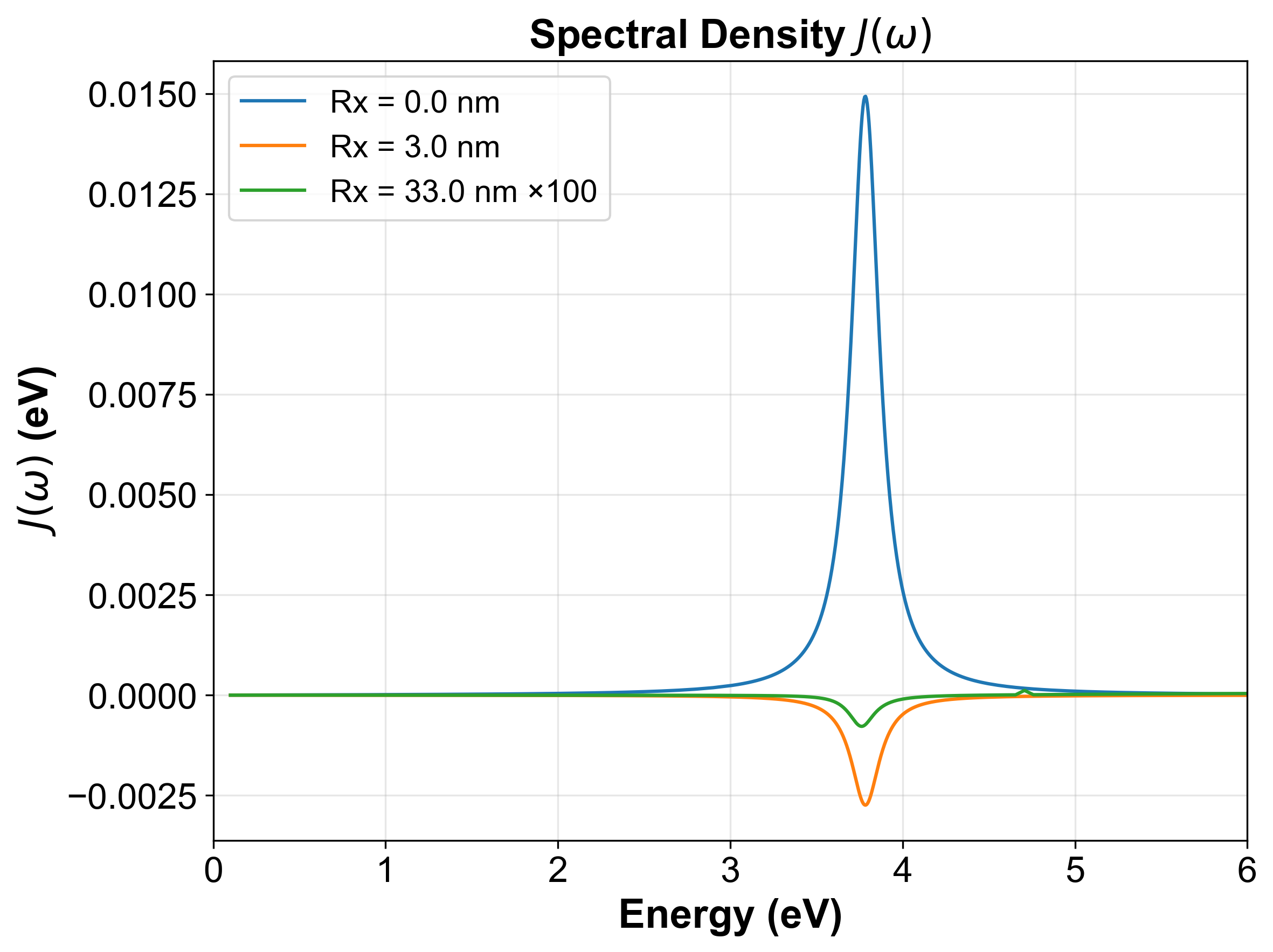
we could reproduce Figure 2C in that paper.
We have put the dyadic Green’s function data at
./data/example/GF_data/Fresnel_GF_planar_Ag_height_1nm_Emin_0.10_Emax_6.00_359pts_Rx_33nm_34pts.hdf5
for user to follow along. The configuration file for this tutorial is
configs/analysis/spec_dens_example.yaml, user can modify the input_file field to point to the above file:
input_file: "${oc.env:MQED_ROOT,./data}/example/GF_data/Fresnel_GF_planar_Ag_height_1nm_Emin_0.10_Emax_6.00_359pts_Rx_33nm_34pts.hdf5"

# --- Output ---
output_prefix: "spec_dens_${mu_D_debye}D_${mu_A_debye}D"

# --- Dipole moment magnitudes (Debye) ---
mu_D_debye: 10
mu_A_debye: 10

# --- Dipole orientations ---
# theta_deg: polar angle from z-axis (degrees).  Use 'magic' for the magic
#            angle θ ≈ 54.74° that averages orientational effects.
# phi_deg:   azimuthal angle in x-y plane (degrees).  Use 'magic' for
#            isotropic averaging.
orientations:
  donor:
    theta_deg: 90.0
    phi_deg: 0.0
  acceptor:
    theta_deg: 90.0
    phi_deg: 0.0
Here we set the both donor and acceptor dipoles to be x-oriented with a magnitude of 10 Debye. User can run the following command to compute the spectral density:
python -m mqed.analysis.spectral_density --config-name spec_dens_example
Or
mqed_calc_spec_dens --config-name spec_dens_example
This reads the default configuration from
configs/analysis/spec_dens_example.yaml, loads the GF data,
computes the spectral density according to the specified parameters,
and save the result in an HDF5 file.
The output file spec_dens_10D_10D_Emin_0.10_Emax_6.00_359pts_height_1nm.hdf5
will be used in the next step for plotting the spectral density curve.
Step 2 — Plot the spectral density
python -m mqed.plotting.plot_spectral_density \
   --config-name=plt_spec_dens_direct_sg \
   curves=[] \
   input_file='${oc.env:MQED_ROOT,./data}/example/spec_dens_data/spec_dens_10D_10D_Emin_0.10_Emax_6.00_359pts_height_1nm.hdf5' \
   plot_settings.separation_indices='[0,3,33]' \
   plot_settings.separation_multipliers='[1.0,1.0,100]' \
   plot_settings.filename=Spec_dens_drude.png
Or
mqed_plot_spec_dens \
   --config-name=plt_spec_dens_direct_sg \
   curves=[] \
   input_file='${oc.env:MQED_ROOT,./data}/example/spec_dens_data/spec_dens_10D_10D_Emin_0.10_Emax_6.00_359pts_height_1nm.hdf5' \
   plot_settings.separation_indices='[0,3,33]' \
   plot_settings.separation_multipliers='[1.0,1.0,100]' \
   plot_settings.filename=Spec_dens_drude.png
This reuses the bundled comparison plotting config
configs/plots/plt_spec_dens_direct_sg.yaml but clears its multi-file
curves list so the command plots the single HDF5 file produced in Step 1.
For a direct-vs-singularity-aware comparison, run the same config without the
curves=[] override. You can modify the configuration file to adjust the
plot settings (e.g., axis labels, title, line styles), or override specific
parameters from the command line.
The configuration looks like this:
# Single-file override of configs/plots/plt_spec_dens_direct_sg.yaml

# --- Input ---
# Path to the spectral density HDF5 file produced by
# mqed.analysis.spectral_density.
curves: []
input_file: "${oc.env:MQED_ROOT,./data}/example/spec_dens_data/spec_dens_10D_10D_Emin_0.10_Emax_6.00_359pts_height_1nm.hdf5"

# --- Font settings (following plot_pr.py conventions) ---
font:
  family: "Arial"
  labelsize: 18
  ticksize: 16
  legendsize: 14
  titlesize: 18
  labelweight: "bold"
  titleweight: "bold"

# --- Plot settings ---
plot_settings:
  # For separation-indexed layout: which Rx indices to plot (0-based)
  # Example: [0, 3] overlays the curves for Rx index 0 and Rx index 3.
  separation_indices: [0,3,33]
  separation_multipliers: [1.0,1.0,100]

  # For pair-indexed layout: which (α, β) pairs to plot
  # Each entry is [alpha, beta].  [0, 0] = self-term of emitter 0.
  # Example: [[0, 0], [0, 3]] overlays both pair-resolved curves.
  pair_indices:
    - [0, 0]
    - [0, 3]
  pair_multipliers: [1.0,1.0]

  # Labels
  # For separation layout, {Rx} is replaced by the Rx value in nm
  label_template: "Rx = {Rx:.1f} nm"
  xlabel: "Energy (eV)"
  ylabel: "$J(\\omega)$ (eV)"
  title: "Spectral Density $J(\\omega)$"

  # Axis scales: "linear" or "log"
  xscale: "linear"
  yscale: "linear"

  # Optional axis limits (null = auto)
  x_range_eV: [0,6]
  y_range: null

  # Style
  figsize: [8, 6]
  lw: 1.5
  dpi: 300
  grid: true

  # Output
  save_plot: true
  filename: "Spec_dens_drude.png"
The output figure will look like this: (identical to the reference [Chuang2022] Figure 2C up to axis labels and styling):
Note
This example uses a planar system with translational symmetry, so the GF data
is in separation layout and the plotted curves are selected by
separation_indices or separation_values_nm. Mie scan outputs use
scan_distance_values_nm instead, and pair-layout outputs use
pair_indices. Compact ring_circulant inputs are expanded to the same
scalar pair-matrix output and also use pair_indices.
Green-function layouts
The spectral-density command accepts the shared HDF5 layouts written by the Green-function drivers:
Layout |
Input Green tensor shape |
How curves are selected for plotting |
|---|---|---|
|
|
|
|
|
|
|
|
|
|
|
|
The projection formula is the same in all cases. The layout only controls how position metadata is interpreted and how the curves are indexed.
Configuration reference — analysis
The analysis step is configured by
configs/analysis/spectral_density.yaml. A minimal version looks like:
# configs/analysis/spectral_density.yaml

input_file:  '${oc.env:MQED_ROOT,./data}/gf_data.hdf5'
output_file: 'spectral_density.hdf5'

orientations:
  donor:
    theta_deg: 90.0
    phi_deg:   0.0
  acceptor:
    theta_deg: 90.0
    phi_deg:   0.0
Parameter |
Default |
Description |
|---|---|---|
|
|
Path to the GF HDF5 file (supports |
|
|
Output HDF5 file for the computed spectral density. |
|
|
Polar angle \(\theta\) (degrees) of the donor transition dipole moment. |
|
|
Azimuthal angle \(\phi\) (degrees) of the donor transition dipole moment. |
|
|
Polar angle \(\theta\) (degrees) of the acceptor transition dipole moment. |
|
|
Azimuthal angle \(\phi\) (degrees) of the acceptor transition dipole moment. |
Tip
You can specify the magic angle orientation (\(\theta \approx
54.74°\)) by using the keyword magic in place of a numeric value in
any theta_deg or phi_deg field.
Specifying dipole orientations
The orientation of each transition dipole is given in spherical coordinates \((\theta, \phi)\). Common choices:
x-oriented dipole —
theta_deg: 90, phi_deg: 0y-oriented dipole —
theta_deg: 90, phi_deg: 90z-oriented dipole —
theta_deg: 0, phi_deg: 0Magic angle —
theta_deg: magic(≈ 54.74°, isotropic average)
To override the orientations from the command line:
python -m mqed.analysis.spectral_density \
    orientations.donor.theta_deg=0 \
    orientations.acceptor.theta_deg=0
This sets both donor and acceptor dipoles to the z-direction.
Using a custom configuration file
You can point Hydra at a different configuration directory or override the config name (Similar in tutorial Dyadic Green’s Function via Sommerfeld Integrals):
mqed_plot_spec_dens \
    --config-path /absolute/path/to/my_configs \
    --config-name my_spectral_density
Or override individual values via the command line:
mqed_plot_spec_dens \
    --config-path /absolute/path/to/my_configs \
    --config-name my_spectral_density
Configuration reference — plotting
The plotting step is configured by one of the spectral-density plot configs,
such as configs/plots/plt_spec_dens_direct_sg.yaml for comparing direct and
singularity-aware quadrature. A minimal single-file version looks like:
# configs/plots/plt_spec_dens_direct_sg.yaml

input_file: '${oc.env:MQED_ROOT,./outputs}/spectral_density/spectral_density.hdf5'

font:
  family:       Arial
  labelsize:    18
  ticksize:     16
  legendsize:   14
  titlesize:    18
  labelweight:  bold
  titleweight:  bold

plot_settings:
   separation_indices: [0]
   scan_distance_values_nm: [0, 2, 20]
   pair_indices: [[0, 0]]
   label_template:     'Rx = {Rx:.1f} nm'
   xlabel:             'Energy (eV)'
   ylabel:             'J (eV)'
   title:              'Spectral Density'
   xscale:             linear
   yscale:             linear
   figsize:            [8, 5]
   lw:                 1.5
   dpi:                300
   grid:               true
   save_plot:          true
   filename:           'spectral_density.png'
Parameter |
Default |
Description |
|---|---|---|
|
(see YAML) |
Path to the spectral density HDF5 file. |
|
|
Matplotlib font family. |
|
|
Font size for axis labels. |
|
|
Font size for tick labels. |
|
|
Font size for the legend. |
|
|
Font size for the plot title. |
|
|
Font weight for axis labels. |
|
|
Font weight for the plot title. |
|
|
List of separation (Rx) indices to plot when using the separation-indexed GF layout. |
|
|
List of emitter-pair index pairs |
|
|
List of observer-source distances in nanometres to plot when using the scan-indexed GF layout, for example Mie scan output. |
|
|
Python format string for the legend label. |
|
|
Label for the x-axis. |
|
|
Label for the y-axis. |
|
|
Plot title. |
|
|
Scale for the x-axis ( |
|
|
Scale for the y-axis ( |
|
|
Figure size in inches |
|
|
Line width for the plotted curves. |
|
|
Resolution of the saved figure. |
|
|
Whether to display a grid on the plot. |
|
|
Whether to save the figure to disk. |
|
|
Filename for the saved figure. |
Customising the plot from the command line
Override any plotting parameter via Hydra:
python -m mqed.plotting.plot_spectral_density \
    plot_settings.xscale=log \
    plot_settings.yscale=log \
    plot_settings.title='Log-scale Spectral Density' \
    plot_settings.filename=spectral_density_log.png
Expected output
After running Step 1 (analysis), the output HDF5 file
(spectral_density.hdf5) contains:
J_eV— the spectral density array in eV. The shape depends on the GF layout:Separation layout
[K, M]: K separation indices, M energy points.Scan layout
[P, M]: P explicit observer positions for one fixed source, over M energy points.Pair layout
[N, N, M]: all emitter pairs for N emitters over M energy points.
energy_eV— the energy grid in eV.Rx_nm(separation layout only) — the donor–acceptor separations in nanometres.observer_positions_nmandsource_position_nm(scan layout only) — explicit Cartesian positions for the fixed-source observer scan.observer_distances_nm(scan layout only) — observer-source distances used byscan_distance_values_nmin the plot config.
After running Step 2 (plotting), you will find a PNG file (default:
spectral_density.png) showing \(J_{\alpha\beta}(\omega)\) versus
energy.
Using the output in downstream analyses
The spectral density is a key input for quantum-dynamics simulations. You can load it in your own scripts:
import h5py
import numpy as np

with h5py.File('spectral_density.hdf5', 'r') as f:
    J_eV     = np.array(f['J_eV'])
    energy_eV = np.array(f['energy_eV'])

# Use J_eV and energy_eV in your quantum-dynamics workflow
# e.g., as input to the Lindblad master equation solver
See also
Dyadic Green’s Function via Sommerfeld Integrals — computing the dyadic Green’s function that serves as input.
N-Layer Dyadic Green’s Function Workflow — finite planar-stack Green-function workflow.
Mie Green’s Function for Spherical Cavities — spherical-cavity Mie Green-function workflow.
Quantum Dynamics — using the spectral density in a quantum-dynamics simulation.
Plotting & Analysis — general plotting utilities in MQED.