Getting Started
This page introduces the core simulation workflow and the command-line tools that ship with MQED-QD. Make sure you have completed Installation before proceeding.
Simulation workflow
A typical MQED-QD study follows a three-stage pipeline:
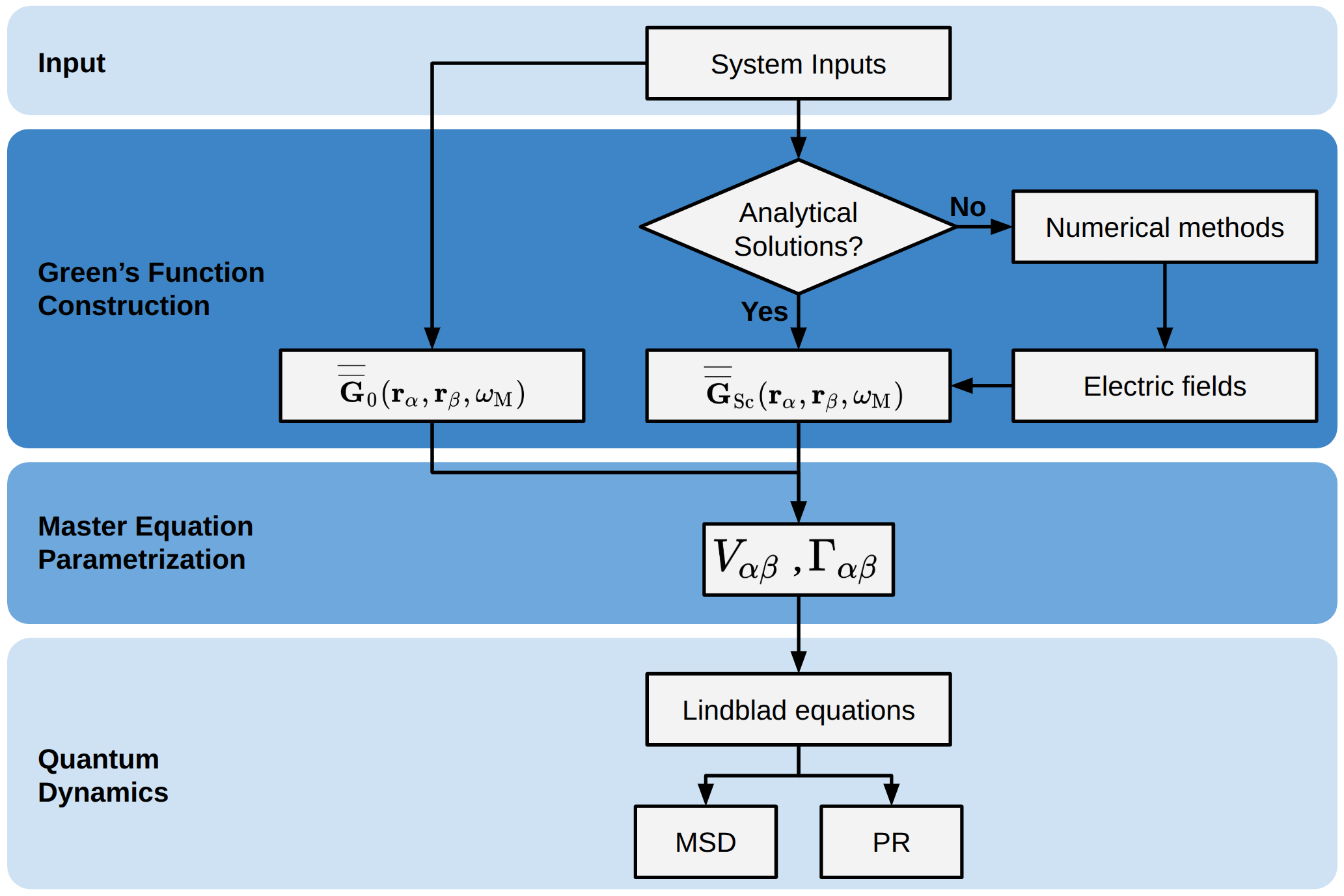
Each stage reads its configuration from a YAML file under configs/ and
writes results into a timestamped Hydra output directory under outputs/.
CLI commands
Installing the package registers the following entry points:
Command |
Description |
|---|---|
|
Compute the dyadic Green’s function for a planar layered system (Sommerfeld integration). |
|
Compute the dyadic Green’s function for a finite N-layer planar stack. |
|
Compute the dyadic Green’s function for sphere, spherical-cavity, and core-shell Mie geometries. |
|
Convert Green-function HDF5 files into spectral density \(J(\omega)\). |
|
Plot spectral density curves from the analysis HDF5 output. |
|
Resonance energy transfer analysis. |
|
Field-enhancement analysis. |
|
Plot signed or absolute physical \(V_{ij}\) and \(\hbar\Gamma_{ij}\) versus separation from Green-tensor HDF5 data. |
|
Check separation-indexed Green tensors for non-finite values and isolated spectral excursions after quadrature warnings. |
|
Time evolution with Lindblad master equation. |
|
Time evolution with the non-Hermitian Schrödinger equation (faster for large systems). |
|
Disorder-averaged NHSE sweep. |
|
Plot mean-squared displacement. |
|
Plot root-mean-squared displacement. |
|
Plot inverse participation ratio. |
|
Plot participation ratio. |
|
Compute effective dipole-moment intensity (BEM). |
|
Reconstruct dyadic Green’s function from BEM simulation. |
Quick first run
The fastest way to verify everything works is to run the Green’s function simulation with default settings:
mqed_GF_Sommerfeld
This computes the dyadic Green’s function for a silver half-space at 1.0 eV with donor and acceptor 5 nm above the surface. When it finishes you will see a log line like:
Simulation complete. Output saved to: /…/outputs/Dyadic_GF_Sommerfeld/…/result_Ag_5_nm.hdf5
To override a parameter from the command line:
mqed_GF_Sommerfeld simulation.energy_eV=1.864
Use a different YAML in the same config directory (Recommended)
mqed_GF_Sommerfeld --config-name=my_GF
This loads configs/Dyadic_GF/my_GF.yaml instead of the default
GF_Sommerfeld.yaml. Your custom file must live in the same
configs/Dyadic_GF/ directory. Users are recommended to
copy the default YAML to a new file and edit the copy
to explore different settings while keeping the original intact.
This approach also applies to all other commands and their respective config directories.
Use a YAML from an arbitrary directory
mqed_GF_Sommerfeld --config-dir=/path/to/my/configs --config-name=my_GF
This tells Hydra to look for my_GF.yaml in /path/to/my/configs/
instead of the default config directory. If users wish to store
their custom YAML files in a separate directory, they can
use this approach to keep them organized and avoid cluttering the default.
See the Dyadic Green’s Function via Sommerfeld Integrals tutorial for a full walkthrough including multi-energy runs and downstream usage. For finite planar stacks, use N-Layer Dyadic Green’s Function Workflow; for spherical cavities or core-shell particles, use Mie Green’s Function for Spherical Cavities.
Hydra configuration
Every command reads a YAML config from the configs/ directory.
You can inspect the active configuration for any command with the --cfg job
flag:
mqed_GF_Sommerfeld --cfg job
Override any key on the command line using dot-notation:
mqed_lindblad simulation.Nmol=50 simulation.d_nm=5.0
Hydra automatically:
writes all outputs to a timestamped directory under
outputs/,saves a copy of the resolved config alongside the results, and
supports multi-run sweeps via the
-mflag.
See the Hydra documentation for details on overrides, config groups, and sweeps.
What’s next?
Compute Green’s functions for a planar two-layer system. |
|
Compute Green’s functions for finite planar multilayer stacks. |
|
Compute Mie Green’s functions for spherical cavities and core-shell particles. |
|
Convert Green-function HDF5 files into spectral density curves. |
|
Analyse field enhancement from cached Green’s functions. |
|
Run Lindblad or NHSE time evolution. |
|
Plot MSD, RMSD, and participation ratios. |
See also
- GitHub README
Project overview, installation quick-start, and citation info.